TC017938

[P10 Pro Ultra] Automatic Docking Engaged Error

Hi MOVA Support,

I’m having an issue with my P10 Pro Ultra Gen 2 that started suddenly today. The robot had been working completely normally since I purchased it in August, but today it began repeatedly saying something like “Automatic docking engaged” and then failing to dock.

I have already tried the following:
Removed and thoroughly cleaned the washboard/washing trayCleaned the robot and docking area
Unplugged and restarted the docking station
Shut down and restarted the robot
Created a completely new map

After creating the new map, the robot was able to dock successfully, so I thought the issue was resolved. However, once I started a normal cleaning cycle, when the robot finished and attempted to return to the dock, it failed again and went back to the same “Automatic docking engaged” error.

This is happening even though the robot was previously docking normally and nothing about my setup has changed.

I’ve only had the vacuum since August, so I’m concerned that there may be a hardware, sensor, wheel, or docking-station issue rather than a mapping issue.

Could you please advise on the next steps? If necessary, I would like the unit inspected or repaired/replaced under warranty.

I can provide a video of the failed docking attempt, the serial number, purchase information, and any error logs you need.

Thank you,


Translate
You need to log in to reply. Login | Register

5 Comment

My P10 Pro Ulta Gen 2 will not charge. It’s brand new, out of the box? What can I do?
2026-9-21 00:19:42 Translate

video showing the charging failure and indicator lights, together with your SN and purchase proof.
 
2026-9-21 10:53 CA Translate
Device fails to charge: First, please check whether the charging base is powered on. Confirm both ends of the base power cord are plugged in tightly. Then inspect the charging contacts on the base and robot. Dust on the contacts will cause charging abnormalities, wipe them clean and test again. You may also check docking accuracy: manually place the robot in front of the base, and it will trigger auto-docking to align properly. If the issue persists, please message us privately. Provide a clear
 
2026-9-21 10:53 CA Translate
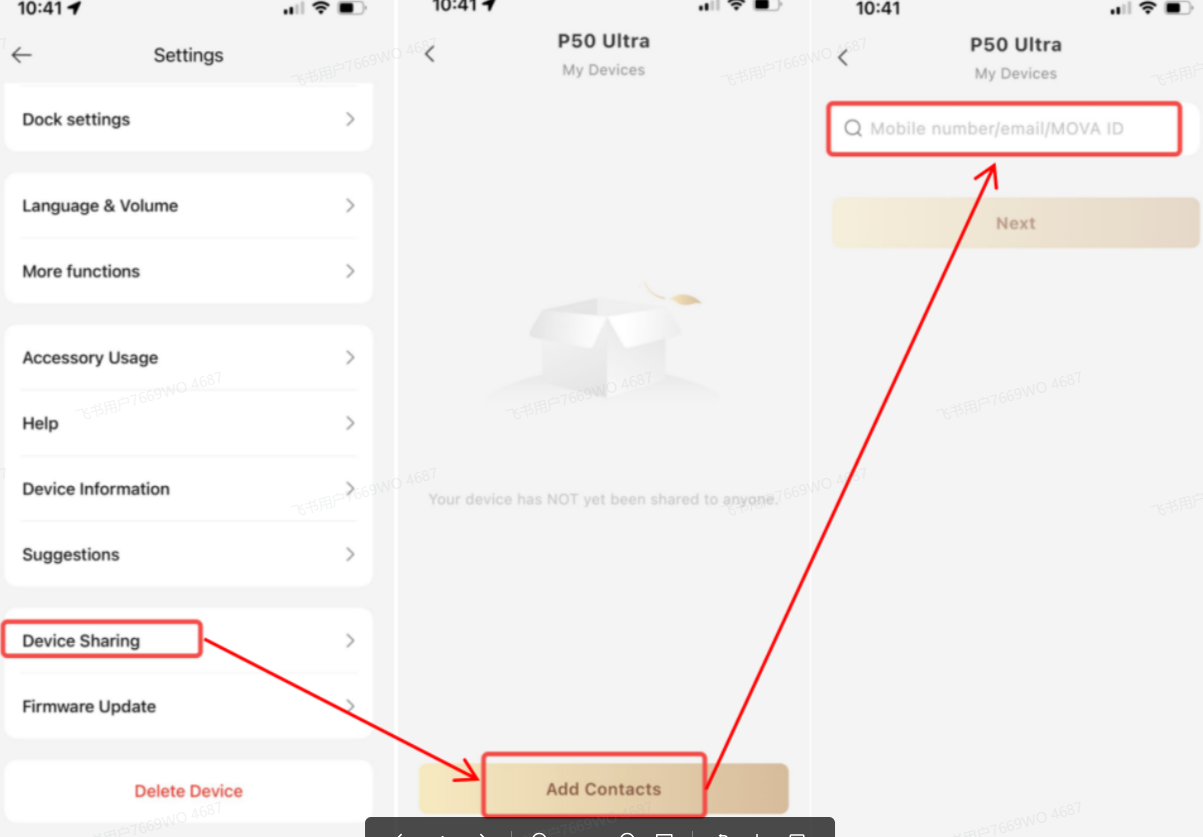
共享设备.png
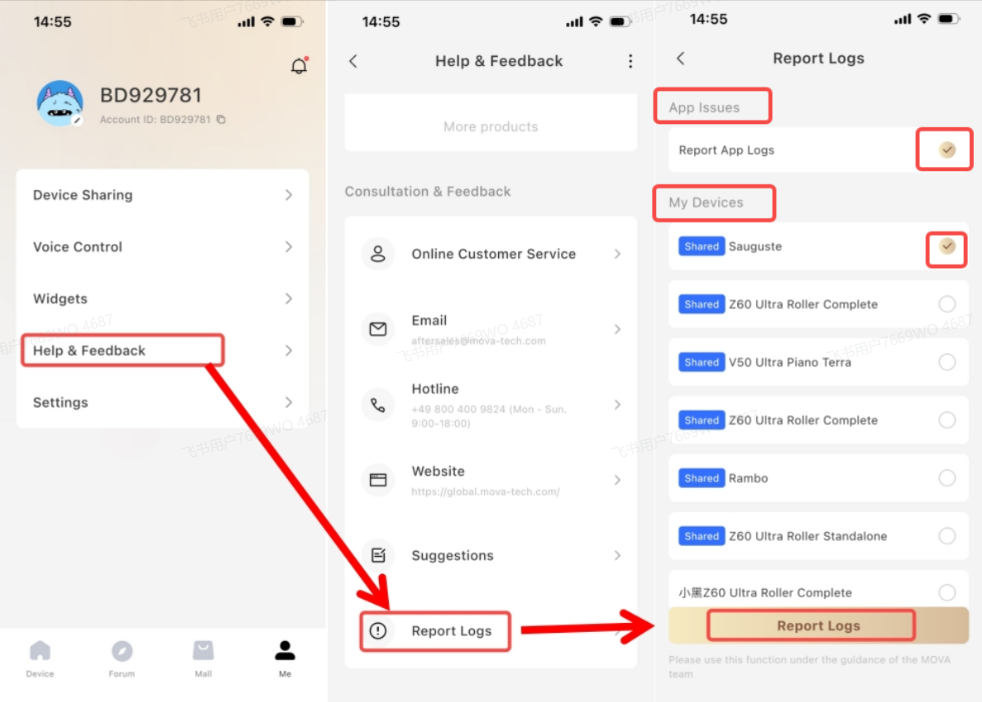
日志.png
We are sorry that your device has this issue. Please contact us via private message and provide the fault‑recording video, then upload the problem log by tapping: Me → Help & Feedback → Upload problem log.
Please also share your device with our technical account: go to Settings → Device Sharing → Add contact → enter ID **HA069213** → Next step.

We will arrange remote technical verification for your device immediately and process your case as soon as possible. Please also provide your SN code and purchase proof when contacting us.
2026-9-21 10:49:37 CA Translate

2026-9-22 00:23:42 CA Translate

UID:TC017938
  • 1Posts
  • 0Friends

© 2026 MOVA Forum All Rights Reserved | Support by Discuz! X5.0 Font by MiSans

Quick Reply Back to Top Return to List